
This tutorial covers the Amplitude and Note Separation tools in Melodyne Editor 2. Dragging a note up or down with the Amplitude Tool adjusts its level, while the Note Separation Tool divides it for more detailed editing. The guide also shows how to select multiple notes and use the pitch-center correction slider to adjust them together. The video demonstrates an older version of Melodyne, so labels and controls may differ in later releases.
Melodyne's Amplitude and Note Separation Tools
This is the second installment of our basic guide to the pitch-editing software Melodyne.
Melodyne Editor Video Tutorials
- 1Basic Operations
- 2Amplitude and Note Separation Tools (this article)
- 3Modulation and Formants
- 4Timing Correction
- 5DNA
- 6Convert Audio to MIDI
- 1Melodyne 4 essential: Overview and Tutorial
- 2Melodyne 4 assistant: Overview and Tutorial
- 3Melodyne 4 editor and studio: Overview and Tutorial
- 4Melodyne 5: New Features in the Popular Pitch Editor
- Manufacturer's website: http://urx.space/Rgab
- Purchase here (affiliate link): http://urx.space/Rgab
Selected Questions and Answers from the YouTube Video

I'm not sure whether replies are still being posted, but is there a way to join notes after separating them?

In the original reply, we described switching to the Edit tab, selecting the notes to be joined, and double-clicking. See the linked example. In current Melodyne versions, a note separation can also be removed by double-clicking the separation with the Note Separation Tool; the exact interface may differ in Editor 2. https://app.box.com/s/b3gh07jc1b9xdpud6a5jjpgnm85vh82f
Can VariAudio adjust the volume of just one section in the same way?
The original answer said a comparable VariAudio feature was unavailable and suggested using automation for the adjustment. This is a historical answer; check the current Cubase documentation for the capabilities of your version. https://sleepfreaks-dtm.com/for-advance-cubase/automation-3/
Video Highlight: The Amplitude Tool
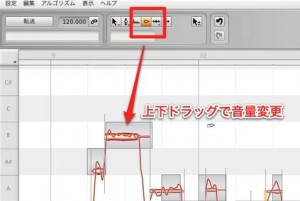
Select the Amplitude Tool and drag a note up or down to change its level.
Video Highlight: Separating Notes
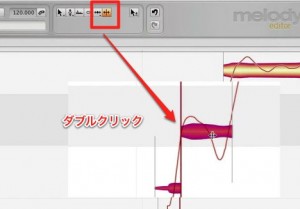
Select the Note Separation Tool and double-click a note
to split it at that point.
Video Highlight: Correcting Pitch for Multiple Notes
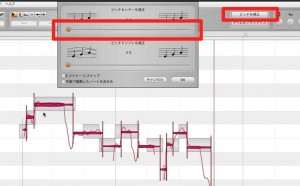
Select the notes you want to correct and choose Pitch Correction at the upper right.
Drag the Correct Pitch Center slider in the window left or right to adjust the correction.
Buy the product here
This article explains how to shop

Frequently Asked Questions
Q1. How do I use Melodyne's Amplitude Tool?
Select the Amplitude Tool, then drag the note you want to adjust up or down to change its level. You can make fine adjustments to individual notes.
Q2. Why would I separate a note?
Double-clicking with the Note Separation Tool splits a note so that different parts can be edited individually, allowing more precise pitch or level adjustments.
Q3. Can I correct the pitch of multiple notes at once?
Yes. Select the notes you want to adjust, then use the Correct Pitch Center slider in the pitch correction window to correct them together.
NEW ARTICLES
Latest English Articles











