
Melodyne Editor 2's modulation and formant tools let you adjust the pitch behavior and tonal character of vocals and other audio. The pitch modulation tool adjusts the amount of variation within a note; flattening that variation can contribute to a stylized, hard-tuned vocal effect. The formant tool changes the character of the voice without changing its pitch. Together, these tools offer flexible control for vocal editing.
Melodyne's Modulation and Formant Tools
This tutorial covers Melodyne's modulation and formant tools.
Melodyne Editor Video Tutorials
- 1Basic Operations
- 2Volume and Note Separation Tools
- 3Modulation and Formants (this article)
- 4Timing Correction
- 5DNA
- 6Convert Audio to MIDI
- 1Melodyne 4 essential: Overview and Tutorial
- 2Melodyne 4 assistant: Overview and Tutorial
- 3Melodyne 4 editor and studio: Overview and Tutorial
- 4Melodyne 5: New Features in the Popular Pitch Editor
- Manufacturer's website: http://urx.space/Rgab
- Purchase here (affiliate link): http://urx.space/Rgab
Selected Questions and Answers from the YouTube Video

Can Melodyne 4 assistant and editor create a hard-tuned vocal effect?

For that type of effect, we suggest considering Auto-Tune EFX 3. http://www.autotune.mu/products/auto-tune-efx-3/ Please take a look.
Video Highlight: Pitch Modulation Tool
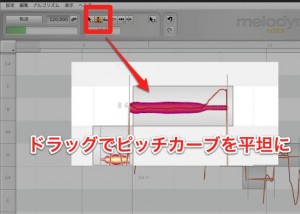
Press and hold the tool outlined in red above,
then select the Pitch Modulation Tool.
Drag a note up or down to reduce or emphasize the pitch variation within it.
Flattening the variation substantially can help create a hard-tuned vocal effect; the result also depends on pitch correction and the source performance.
Video Highlight: Formant Tool
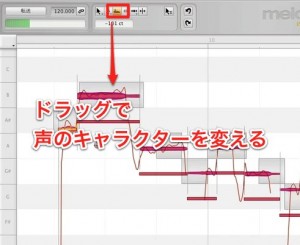
Select the Formant Tool and drag a note up or down
to adjust the character of the voice while keeping its pitch unchanged.
Buy the product here
This article explains how to shop

Frequently Asked Questions
Q1. What is the difference between Melodyne's Pitch Modulation Tool and Formant Tool?
The Pitch Modulation Tool changes the amount of pitch variation within a note, while the Formant Tool changes vocal tone and character without changing pitch. They give you different ways to shape audio.
Q2. How do I create a hard-tuned vocal effect?
Select the Pitch Modulation Tool and drag a note to flatten its pitch variation substantially. This can contribute to the characteristic effect, though the result also depends on pitch correction and the source performance.
Q3. Does the Formant Tool change pitch?
The Formant Tool changes the character of the voice while leaving its pitch unchanged. It is useful for changing tone without moving the note's pitch.
NEW ARTICLES
Latest English Articles











