
The DNA function in Melodyne Editor 2 is an innovative tool that breaks audio tracks containing chords down into individual notes so that you can edit their pitch freely. Simply select polyphonic mode from the Algorithm menu and chords are recognized automatically, letting you intuitively correct the pitch of complex musical sounds and change arrangements in ways that were impossible with conventional monophonic editing. It can handle everything from fine adjustments to vocals and instruments to major changes in instrumentation, and it has attracted attention as a feature that greatly expands the freedom of DTM production.
Melodyne's "DNA function": break chords apart and edit them
Using the DNA function,
you can break down audio that contains chords and freely change the pitch of each note.
Melodyne Editor video index
- 1Basic operations
- 22_Amplitude tool and Separation tool
- 3Modulation and formants
- 4Rhythm correction
- 5DNA (this article)
- 6Converting audio files to MIDI
- 1Melodyne 4 essential: overview and usage
- 2Melodyne 4 assistant: overview and usage
- 3Melodyne 4 editor/studio: overview and usage
- 4New features in Melodyne 5, the standard pitch editing software
- ◆ Manufacturer site: http://urx.space/Rgab
- ◆ Buy here (affiliate link): http://urx.space/Rgab
Video point: Using the DNA function
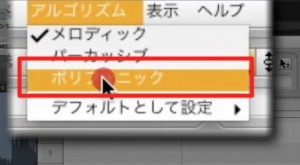
Select "Algorithm" → "Polyphonic" from the top menu.
This alone activates the DNA function, and the notes are displayed as chords.
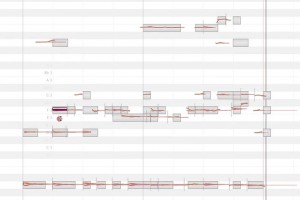
Once displayed as chords,
you can perform all of the operations introduced in the videos so far and edit flexibly.
Buy the product here
How to shop is explained in this article

Frequently Asked Questions
Q1. How do I use the DNA function?
After launching Melodyne Editor 2, just select "Polyphonic" from "Algorithm" in the top menu. This automatically enables the DNA function, and the chords are recognized and displayed as individual notes.
Q2. What kind of editing can I do with the DNA function?
You can freely change the individual pitches that make up a chord. This enables flexible audio editing that was previously impossible, such as correcting vocal pitch, removing unwanted overtones and changing the key of a song.
Q3. Which versions of Melodyne support the DNA function?
It is supported in Melodyne Editor 2 and later. If you need more advanced features, you can also consider a higher-tier version such as Melodyne Studio.
NEW ARTICLES
Latest English Articles











