Cubase's track delay is a useful way to fine-tune the attack timing of programmed instruments. Sounds with a slow attack, such as strings, can sound late even when notes are placed exactly on the bar. Track delay reduces the need for detailed manual adjustments by moving playback earlier or later in milliseconds. It is easy to set in the Inspector and can help make drum patterns and string parts sound more natural and in time.
When timing sounds slightly off

When programming notes, you may place them exactly on the bar,
but some sounds have a slow attack and do not feel quite in time.
This is especially common with slow-attack sounds such as strings.
The feature that helps here is track delay.
Despite the name, this is not a delay effect.
It lets you make the selected sound play earlier or later.
It can complete timing adjustments in moments that would take much longer to make manually.
Track delay video tutorial
Setting track delay in Cubase
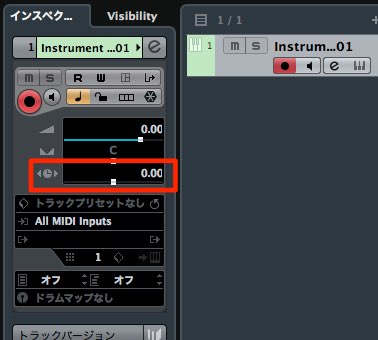
↑ Select the track you want to adjust, then set its delay in the Inspector on the left.
Moving the control left makes the sound play earlier; moving it right makes it play later.
The value is measured in milliseconds.
Try different values until you get the timing you want.
Milliseconds (ms) explained
Frequently asked questions
Q1. How is Cubase track delay different from a delay effect?
Track delay adjusts the timing of the sound itself, while a delay effect adds delayed echoes. They serve different purposes: track delay is used for timing correction.
Q2. What happens if I set a negative delay value?
A negative value makes the sound play earlier, while a positive value makes it play later. Millisecond adjustments allow precise timing corrections.
Q3. Which instruments benefit from track delay?
It is especially useful for slow-attack sounds such as strings and synth pads. If a programmed part feels out of the groove, adjusting its delay can help produce more natural timing.
NEW ARTICLES
Latest English Articles