Cubase's Freeze function is an essential technique for reducing the CPU load caused by an increasing number of software instruments. Click the snowflake icon in the Inspector to bring their CPU usage close to zero and help prevent your computer from slowing down. While a track is frozen, you cannot change anything except its volume and pan, but you can unfreeze it to edit it again. Combining this with multi-timbral instruments and send/return effects can optimize CPU usage further.
Reduce software instrument CPU load

As your project develops, the number of software instruments naturally grows.
Your computer's CPU may struggle to keep up with them,
making the system sluggish or even unresponsive.
The Freeze function solves this problem.
Video: the Freeze function in Cubase
How to freeze a track in Cubase
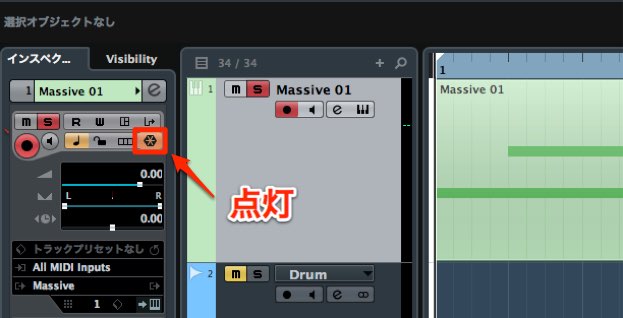
Click the snowflake icon in the Inspector.
That's all it takes! The CPU load is released from the next playback.
Features of Freeze
- It can bring CPU usage close to zero.
- Once a track is frozen, you cannot change anything except its volume and pan until you unfreeze it.
(For example, you cannot edit effects or MIDI programming.) - To unfreeze, simply click the Freeze button again.
- Check ‘Unload Instrument When Frozen’ to free up memory as well.
If your computer's performance is a concern while working, give this a try.
Other solutions
You can also use multiple sounds in a single software instrument.
The following techniques can help save CPU resources when used together.
Use multiple sounds in one software instrument
A multi-timbral instrument lets you load multiple instruments within one software instrument. This guide explains how to set it up.
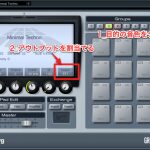
Use multiple outputs for a software instrument
When using multiple instruments in one sound source, you can route each instrument to a separate output. Each output can have its own volume, pan, and effects settings.
Frequently asked questions
Q1. How much does Cubase's Freeze function reduce CPU load?
Freeze can bring CPU usage close to zero. The effect is particularly noticeable on tracks with many software instruments and can greatly improve sluggish performance and audio dropouts.
Q2. How can I make further changes to effects on a frozen track?
Click the Freeze button (the snowflake icon) again to unfreeze it. You can then freely edit effects, MIDI programming, and other settings.
Q3. Are there other ways to reduce CPU load besides Freeze?
You can save CPU resources by using multiple sounds within one multi-timbral software instrument or sharing reverb via send and return channels. Combining these techniques can make your production setup more efficient.
NEW ARTICLES
Latest English Articles