

Useful tools for polished vocal tracks

Have you struggled with vocal correction?
Even in a great song, noticeable pitch fluctuations or small timing differences in the vocals can affect the finished result.
Three plugins available through LANDR—RePitch, VocAlign 6, and Revoice Pro 5—can help.
At the time of this article, they were available at special prices.
Here we explore the features of these three tools for efficient vocal correction.
A table of the historical sale prices appears at the end.
RePitch, VocAlign 6, and Revoice Pro 5: the differences
All three can improve the efficiency of vocal correction, but each has a different specialty.
- RePitch: focused on pitch correction and editing.
- VocAlign 6: focused on aligning timing and pitch.
- Revoice Pro 5: a comprehensive vocal processing tool for timing, pitch correction, doubling, and more.
Let's look at each in detail.
RePitch: improve vocals with natural pitch correction
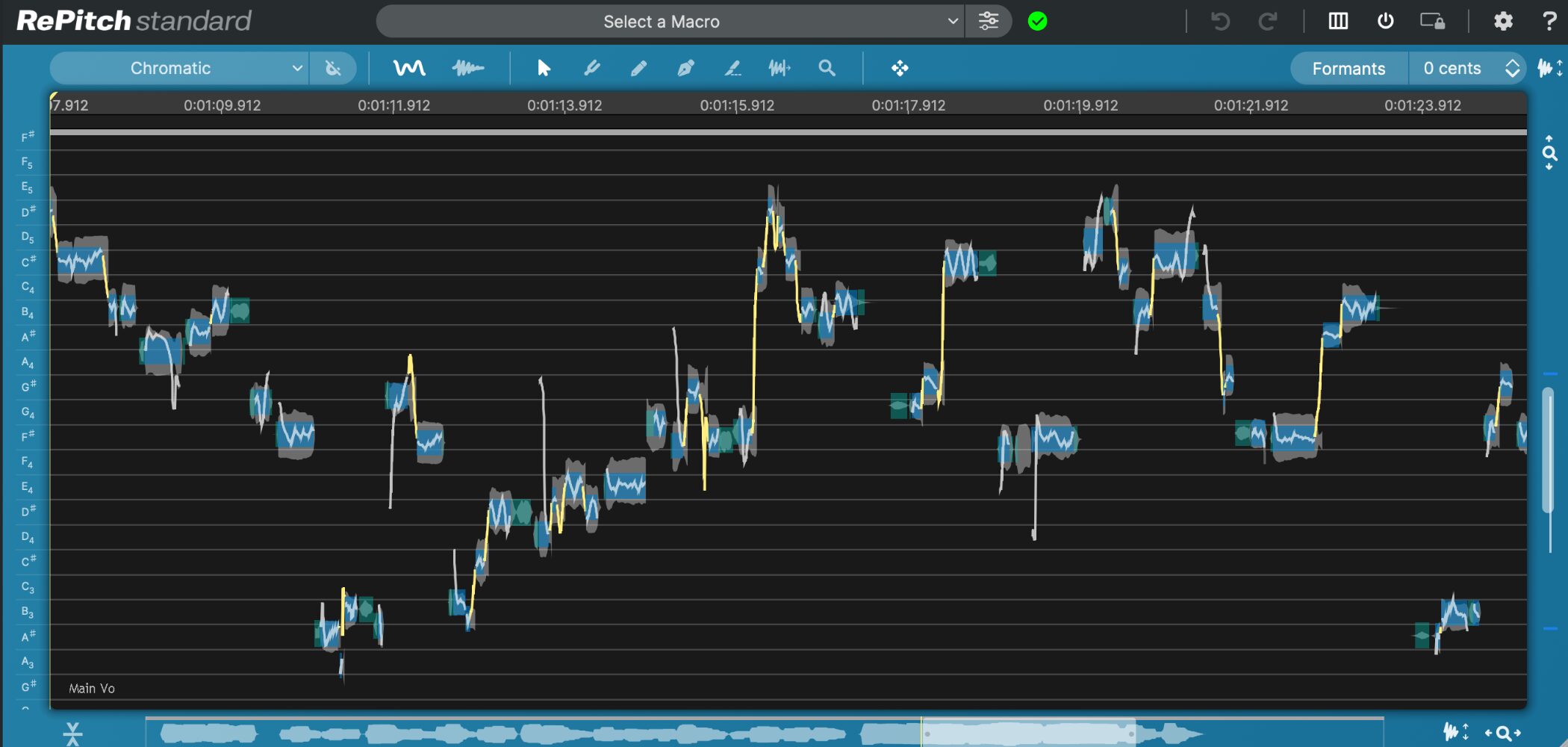
Pitch correction has become an important part of modern vocal processing.
First, listen to the samples before and after RePitch.
RePitch: before
RePitch: after
The pitch and timing have been corrected while retaining a natural result.
RePitch preserves the voice's formants and character, helping avoid a mechanical sound and making vocal correction intuitive.
It is a VST, AU, and AAX plugin that also supports ARA 2, enabling seamless audio and timeline synchronization in compatible DAWs for a more efficient workflow.
The Elements edition is suited to straightforward pitch correction, while Standard adds more advanced editing such as vibrato and formants. This article uses Standard.
Automatic pitch correction
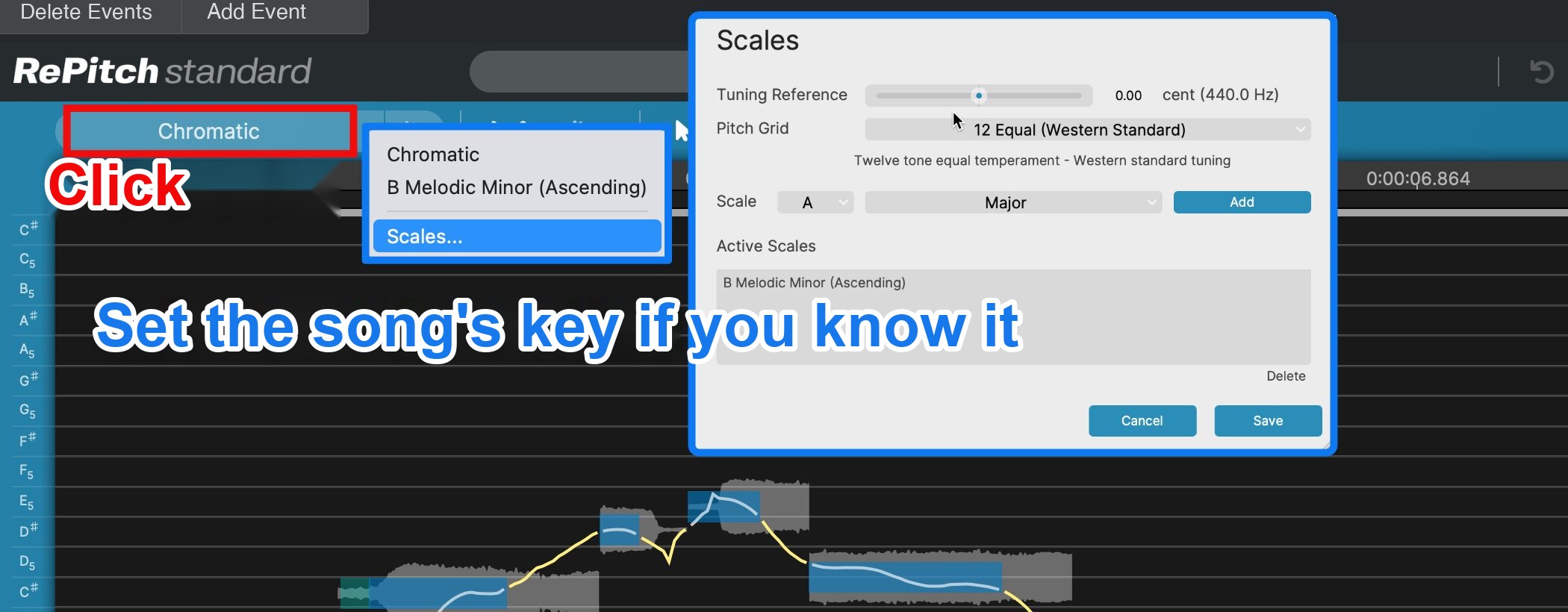
Load the audio and, if you know the song's key, choose it from Chromatic → Scales.
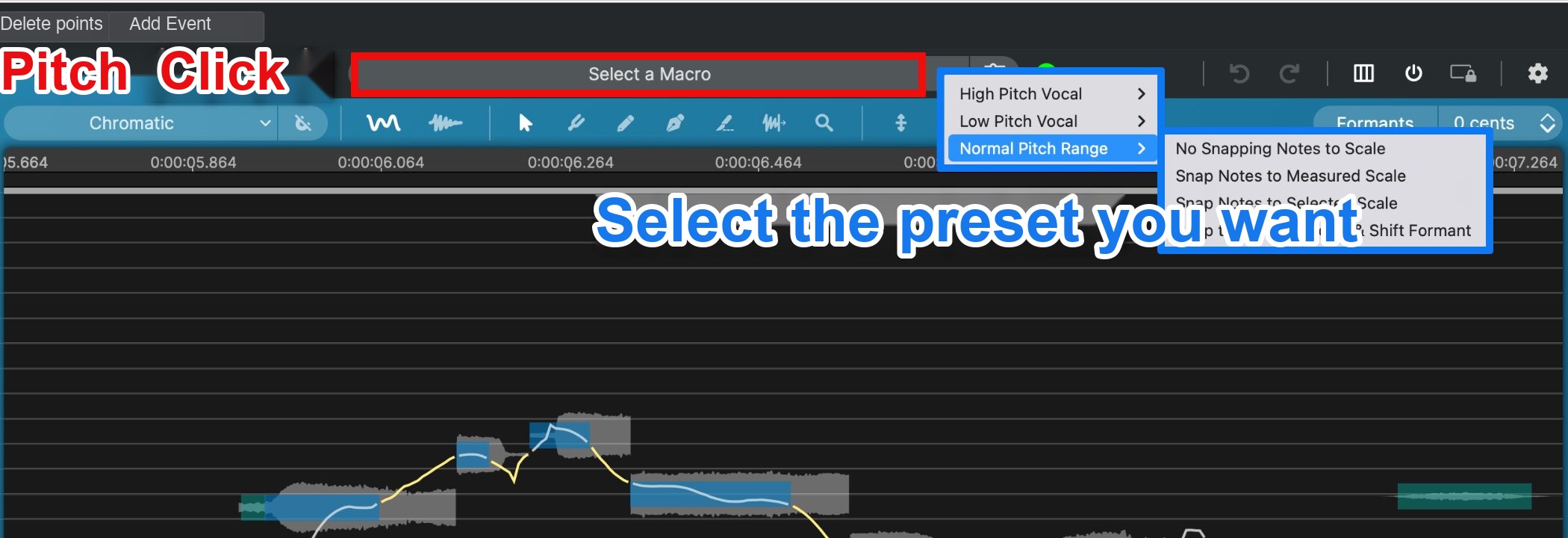
Choose one of the provided presets under Select a Macro.
- High Pitch Vocal: optimized for high ranges, including female vocals and male falsetto.
- Low Pitch Vocal: optimized for low ranges, including male and lower female vocals.
- Normal Pitch Range: optimized for a typical range without extreme highs or lows.
- No Snapping Notes to Scale: retains the original pitches without snapping to a scale, useful for manual correction.
- Snap Notes to Measured Scale: corrects pitch to a scale inferred by analysis, allowing approximate adjustment when the key is unknown.
- Snap Notes to Selected Scale: corrects pitch to a specified scale, such as C major, when the key is known.
- Snap to Selected Scale & Shift Formant: corrects to the chosen scale and also adjusts vocal character.

After choosing a preset, click Yes in Macro Processing to apply it and automatically correct pitch.

You can also enable the Center Notes Tool and use the slider displayed after selecting notes to adjust them together.
Manual pitch and timing correction
If automatic correction does not give the intended result, fine manual adjustment can help achieve the desired result.

When the pointer shows vertical arrows, drag up or down to change pitch; drag the displayed squares vertically to adjust the respective parameters.

Enable the Draw Tool to freely draw adjustment lines with the mouse.
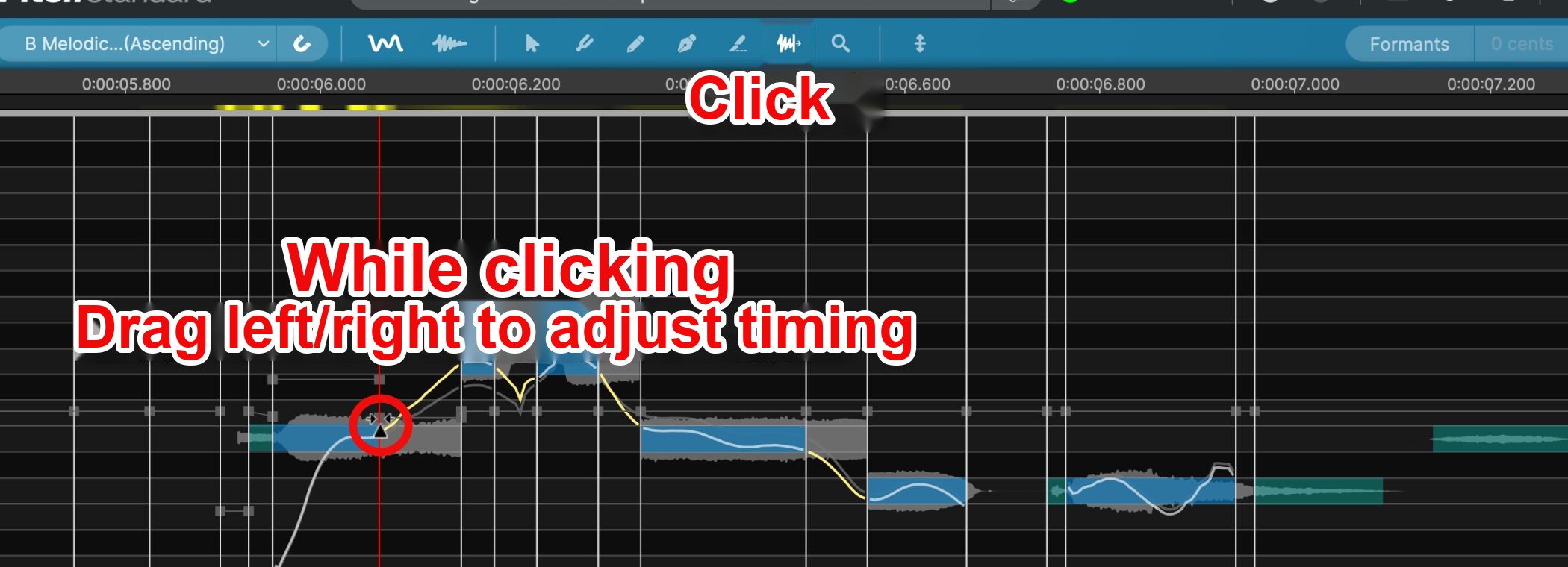
Enable the Warp Point Tool, select a vertical marker, and drag it horizontally to adjust timing.
VocAlign 6: efficient processing of layered vocals

VocAlign 6 makes it easy to align the timing of doubled vocals and harmonies.
Listen to the following examples.
VocAlign: before
VocAlign: after
The vocal parts are aligned more tightly, giving the result a cleaner overall impression.
VocAlign 6 automatically aligns layered vocals to a guide vocal, allowing multiple tracks to be aligned in a few clicks.
Like RePitch, it also supports ARA 2.
Standard is a simpler edition for quickly aligning multiple vocal tracks, while Pro offers fine adjustments and advanced settings. This article uses Pro.
Automatic timing alignment
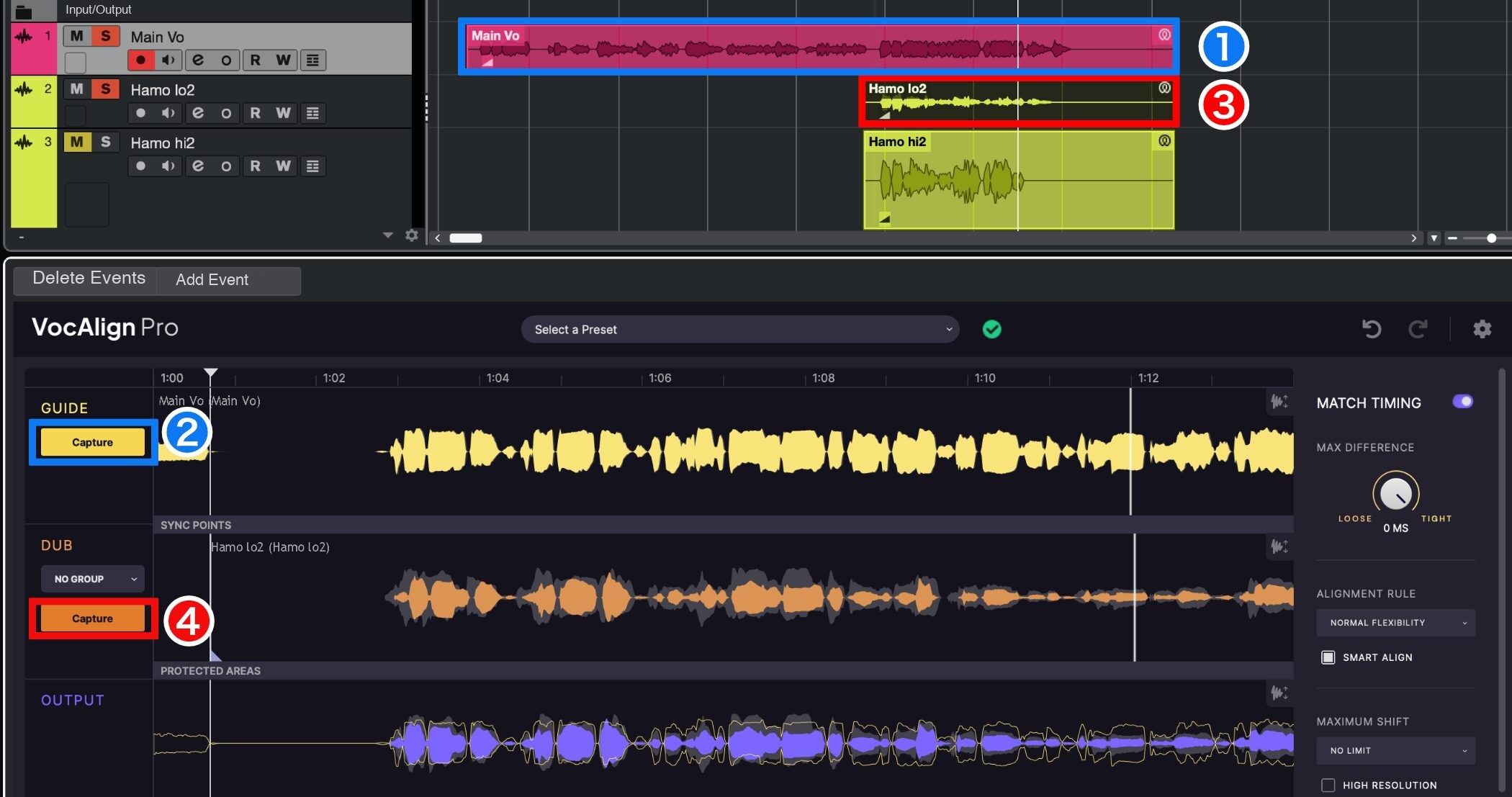
When launched through ARA 2, the operation is straightforward.
① Select the guide vocal track.
② Click Capture under GUIDE.
③ Select the track to align.
④ Click Capture under DUB.
That is all it takes to automatically correct timing, even for users new to alignment.
For best results, correct the guide vocal's timing before loading it.
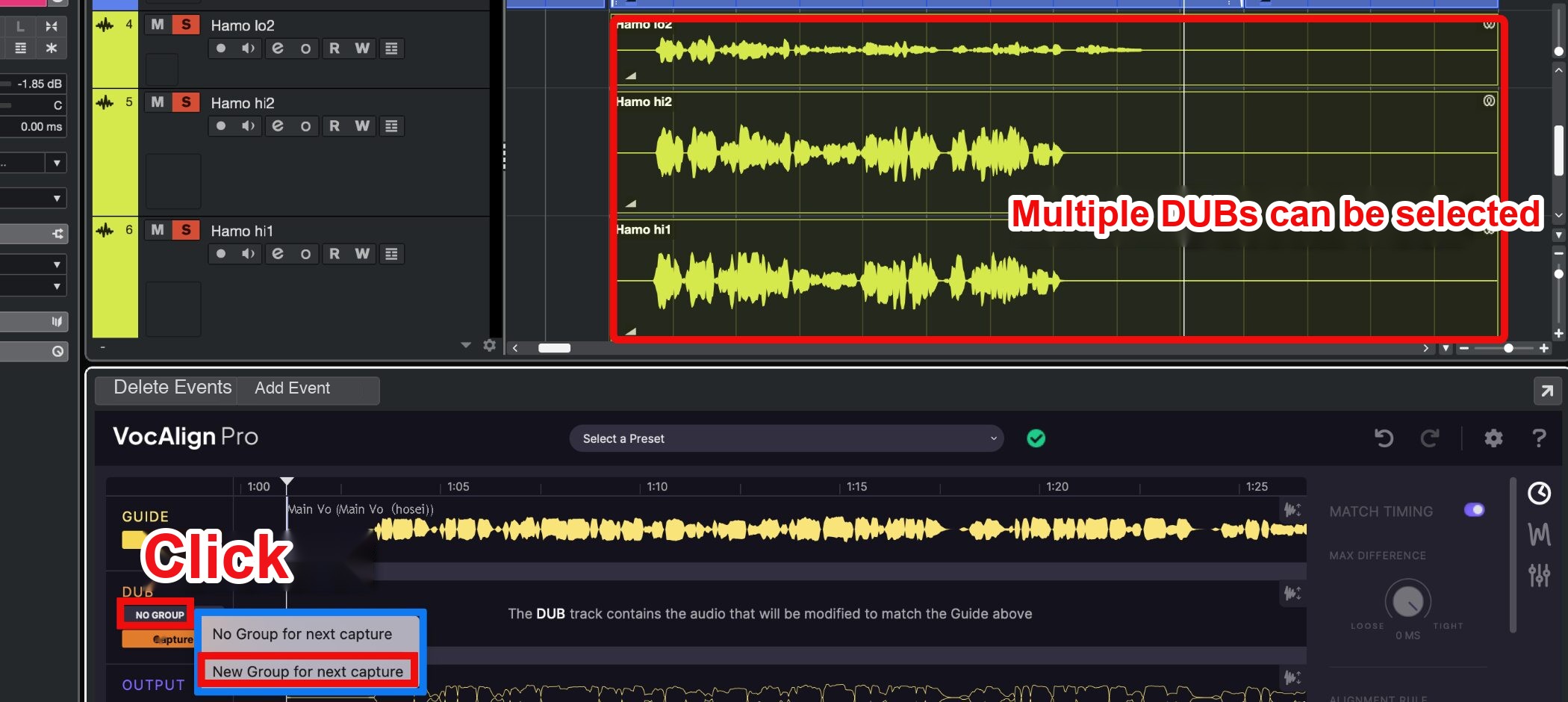
You can also select and capture multiple DUB tracks.
Select the tracks, choose New Group for next capture from NO GROUP, and create a group before clicking Capture to control them together.

MAX DIFFERENCE adjusts the amount of correction; larger values apply bolder correction.
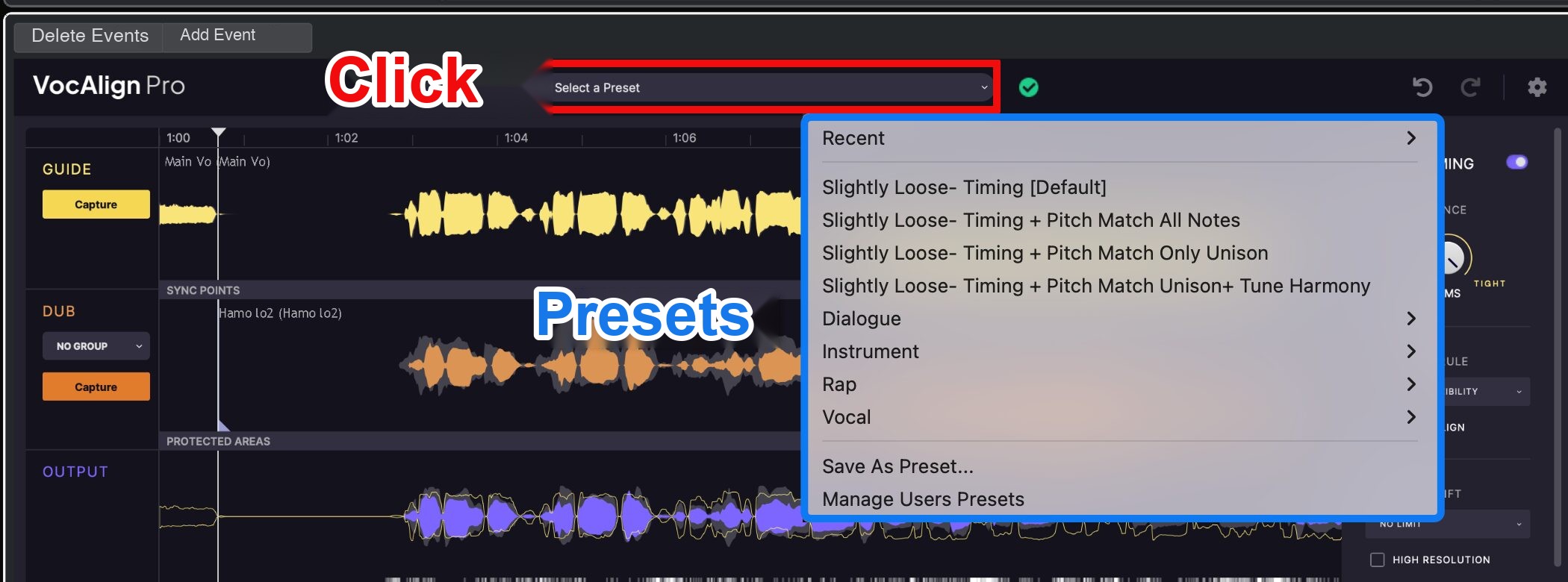
Presets are also available, so try one suited to your goal.
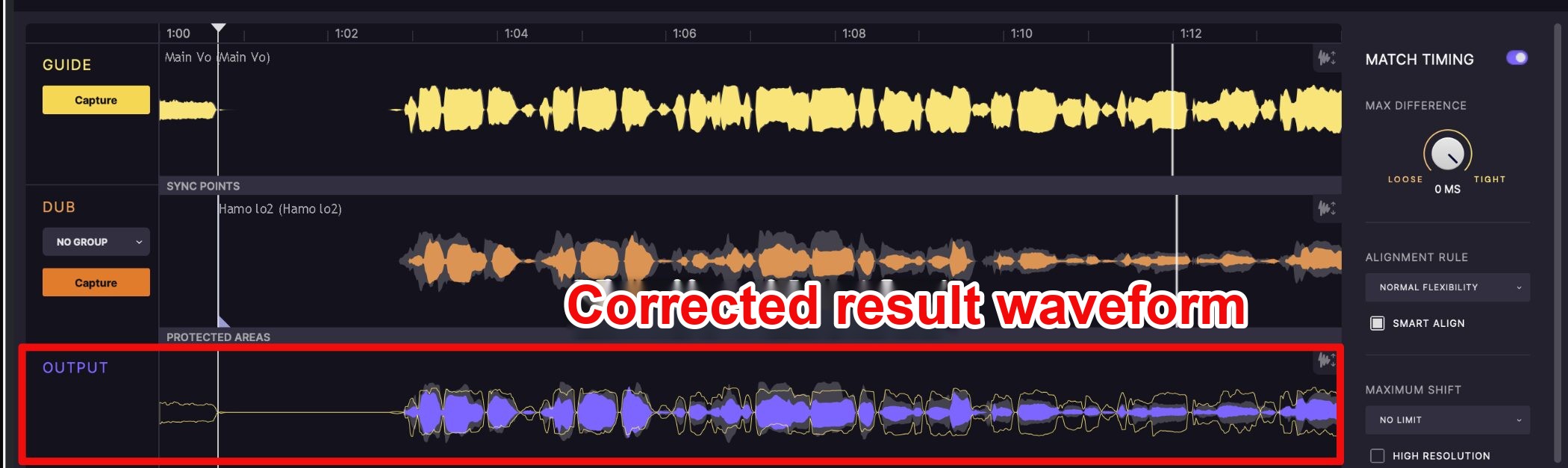
The OUTPUT view overlays the guide waveform in light yellow and the corrected track in purple, so you can visually check their alignment.
Manual timing adjustment
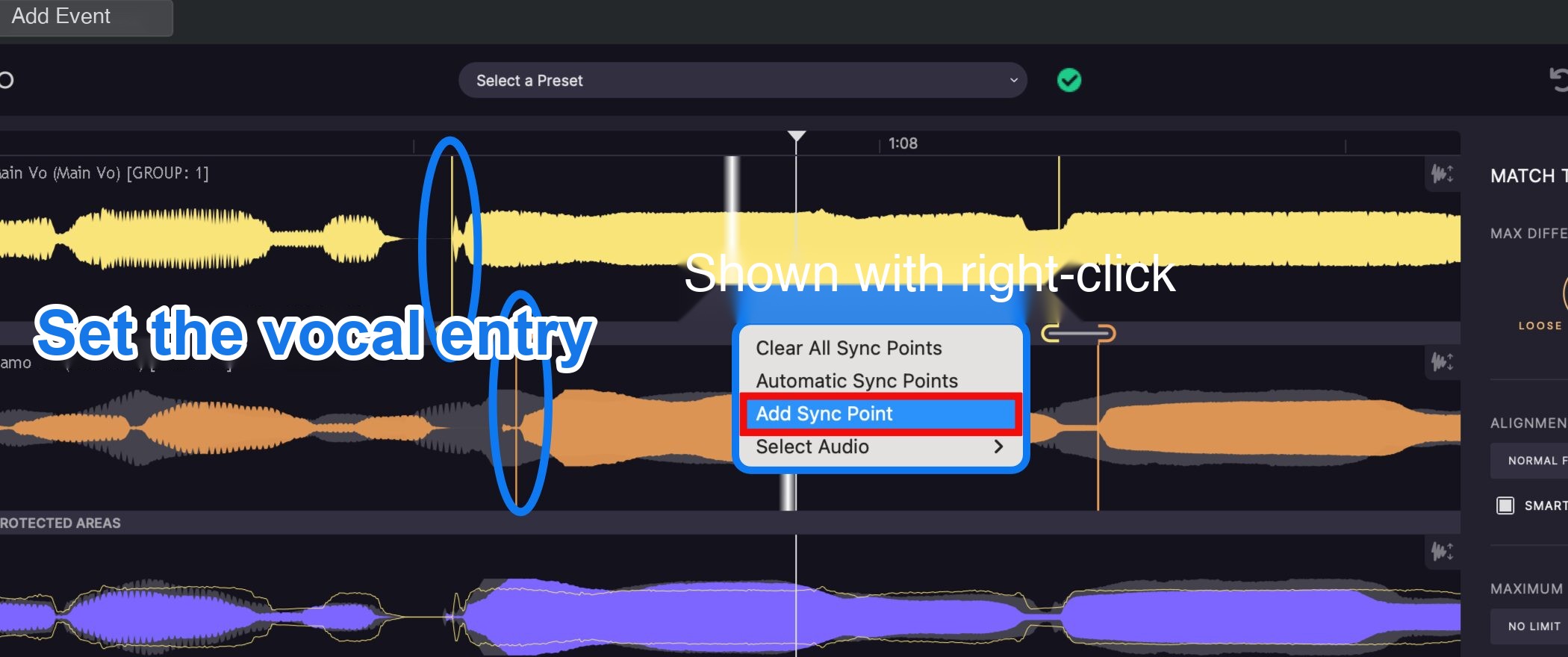
Choose Add Sync Point from the right-click menu and specify the start of the vocal in both GUIDE and DUB for more precise manual alignment.
You can adjust the end of the vocal in the same way.
Revoice Pro 5: professional tools for detailed results
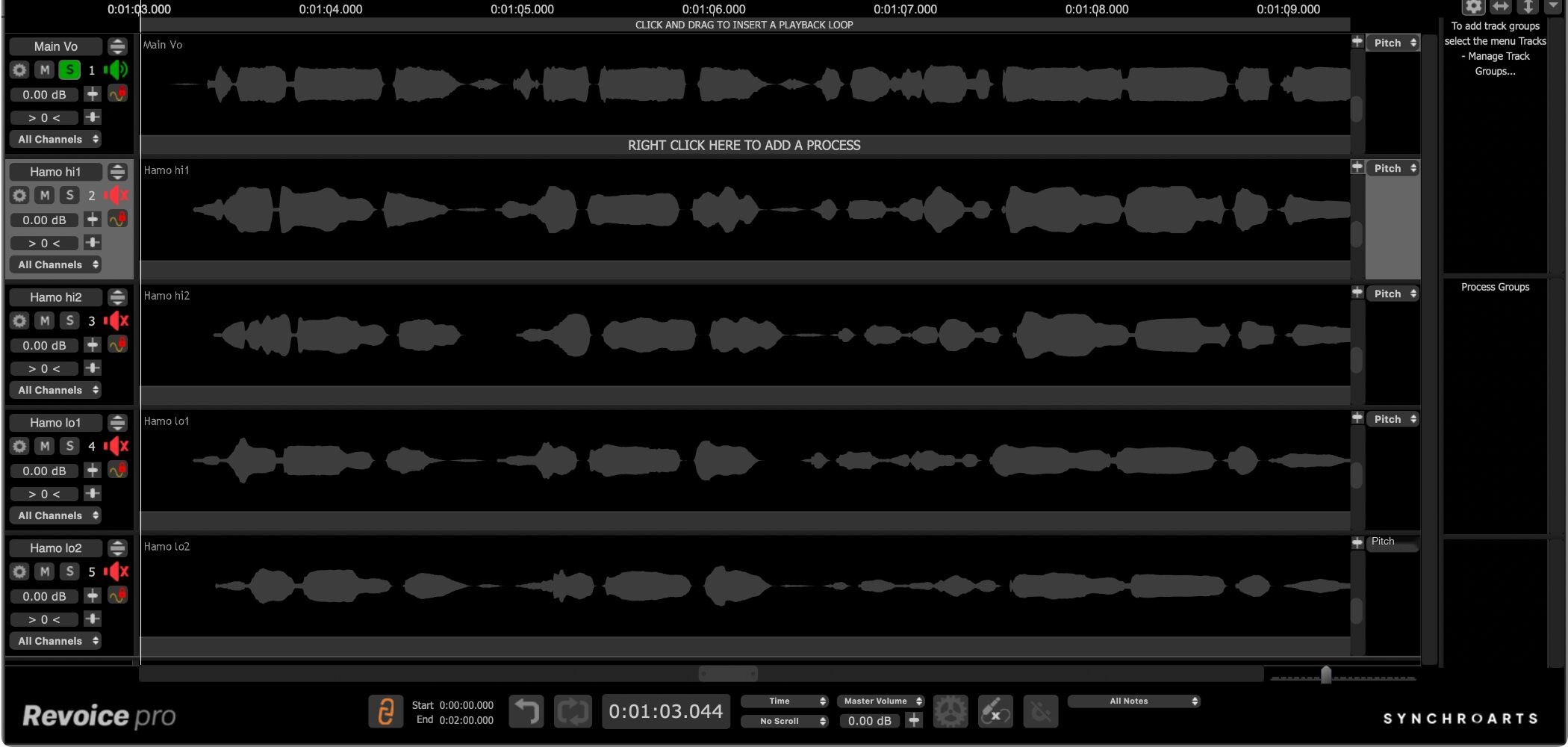
Revoice Pro 5 handles timing, pitch, doubling, harmony generation, and other vocal processing in one application.
A distinctive feature beyond RePitch and VocAlign 6 is the ability to view, edit, and manage multiple tracks simultaneously while combining natural sound with advanced processing.
ARA 2.
Creating doubled vocals
Of its many features, let's look at an easy way to create a doubled vocal.
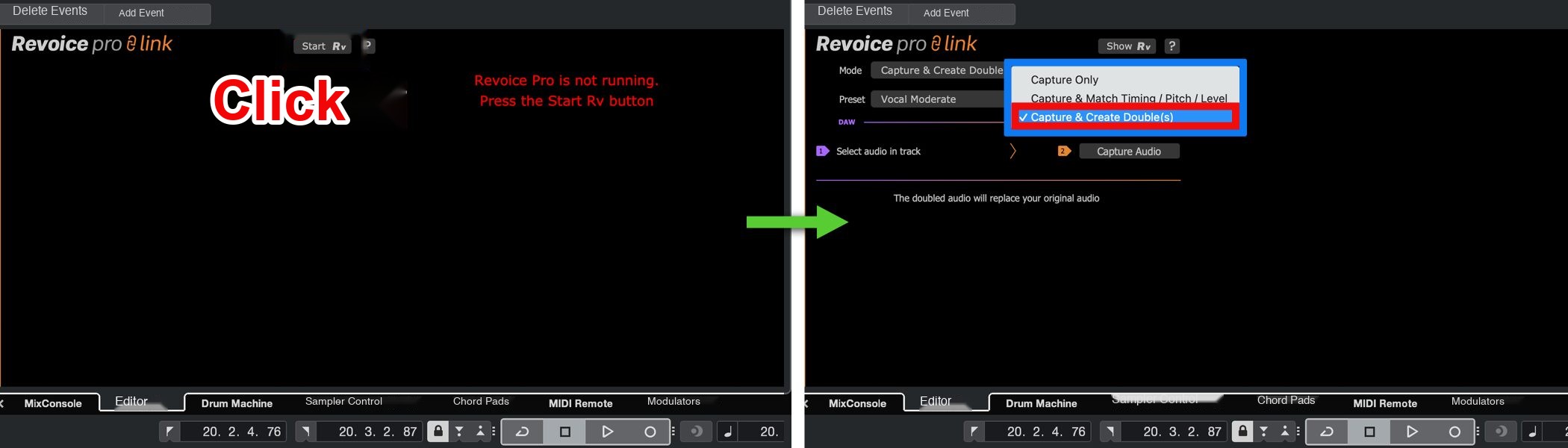
Launch through ARA 2, click Start Rv, then select Capture & Create Double (S) under Mode on the next screen.
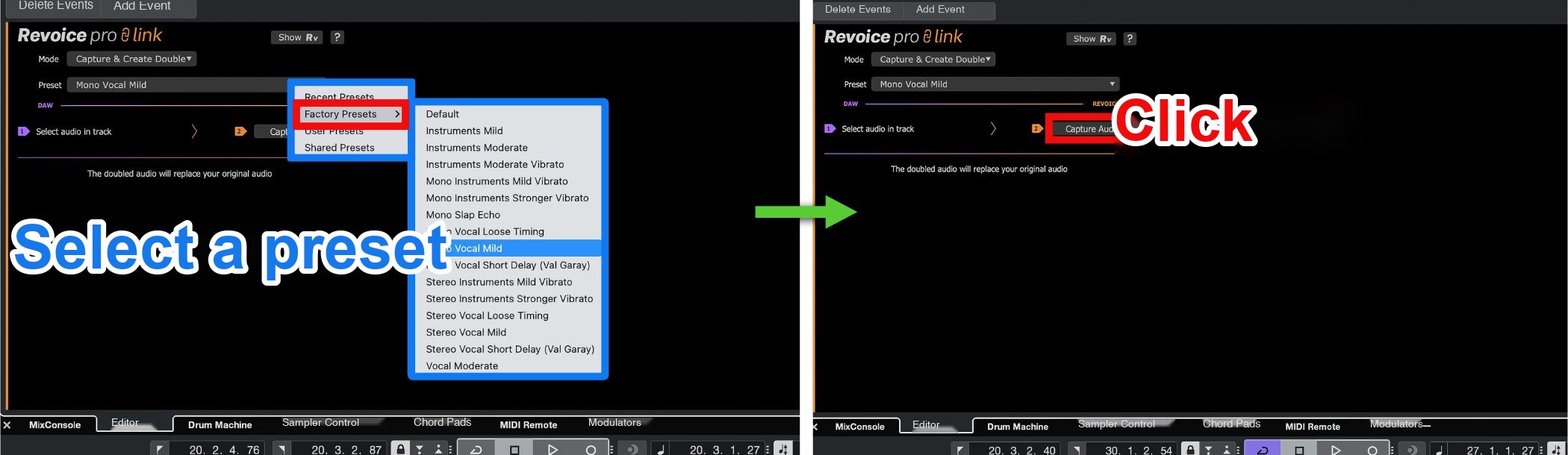
Choose a suitable preset under Factory Presets, select the track to double, and click Capture Audio.

Click Show Rv to open Revoice Pro 5 and see the newly created doubled vocal track.
Revoice Pro 5: doubled vocal
As the example shows, a natural doubled vocal can be created easily.
LANDR's integrated workflow

LANDR is an all-in-one platform for music creators. The article described these features:
- More than three million royalty-free samples
- More than 40 VST plugins
- A reference tool for comparing and adjusting sound against reference tracks
- AI mastering online and as a DAW plugin
- Unlimited distribution optimized for major music services
LANDR offers tools across music production, with a subscription allowing users to go from detailed adjustments through mastering and distribution in one workflow.
Historical sale price tables
LANDR's spring sale ran through April 14, 2025;
plugin bundles were 50% off.
| Revoice Pro 5 | Regular price (excluding tax) | Sale price (excluding tax) |
|---|---|---|
| New license | ¥23,175 | ¥13,905(40% off) |
| Upgrade (from Revoice Pro 3–4) | ¥11,588 | ¥6,953(40% off) |
| Crossgrade (from VocAlign or RePitch) | ¥15,527 | ¥9,316(40% off) |
| RePitch | Regular price (excluding tax) | Sale price (excluding tax) |
|---|---|---|
| Standard new license | ¥11,550 | ¥6,930(40% off) |
| Standard upgrade (from RePitch Elements) | ¥5,750 | ¥3,450(40% off) |
| Standard crossgrade (from VocAlign or Revoice Pro) | ¥7,750 | ¥4,650(40% off) |
| Elements new license | ¥5,350 | ¥3,210(40% off) |
| Elements crossgrade (from VocAlign or Revoice Pro) | ¥3,550 | ¥2,130(40% off) |
| VocAlign 6 | Regular price (excluding tax) | Sale price (excluding tax) |
|---|---|---|
| Pro new license | ¥15,425 | ¥9,255(40% off) |
| Pro upgrade (from VocAlign Ultra, VocAlign Project 5 or 3) | ¥7,713 | ¥4,628(40% off) |
| Pro crossgrade (from RePitch or Revoice Pro) | ¥10,335 | ¥6,201(40% off) |
| Standard new license | ¥11,550 | ¥6,930(40% off) |
| Standard upgrade (from VocAlign Project 5 or 3) | ¥5,750 | ¥3,450(40% off) |
| Standard crossgrade (from RePitch or Revoice Pro) | ¥7,750 | ¥4,650(40% off) |
| RePitch Standard + VocAlign Pro Bundle | Regular price (excluding tax) | Sale price (excluding tax) |
|---|---|---|
| New license | ¥19,300 | ¥11,580(40% off) |
| Plugin Bundle | Regular price (excluding tax) | Sale price (excluding tax) |
|---|---|---|
| Ultimate new license | ¥46,900 | ¥23,450(50% off) |
| Super new license | ¥26,733 | ¥13,367(50% off) |
| LANDR Mastering Plugin | Regular price (excluding tax) | Sale price (excluding tax) |
|---|---|---|
| PRO new license | ¥19,950 | ¥13,367(33% off) |
| SE new license | ¥13,333 | ¥8,000(40% off) |
| LANDR Studio | Regular price (excluding tax) | Sale price (excluding tax) |
|---|---|---|
| Standard annual subscription | ¥9,600 | ¥6,624(31% off) |
| Pro annual subscription | ¥20,160 | ¥12,902(36% off) |
Conclusion
What did you think?
Vocal correction can take time, but the tools introduced here can help streamline the work.
If you are deciding which to buy, consider:
- For detailed pitch adjustment and natural correction of an individual vocal: RePitch.
- For quickly aligning multiple vocal tracks and correcting the timing of doubles or harmonies: VocAlign 6.
- For more detailed advanced editing and multiple vocal processes in one application: Revoice Pro 5.
Choose according to your budget and goals.
These tools can support your next music production.
NEW ARTICLES
Latest English Articles











